
[ ENTERING_THE_BOT_DESK ]
BVT BOT DCA · Grid · Combo Trading bots that run on your own exchange account.
- 3 $EXCHANGES
- 3 $BOT_TYPES
- 10,000 $PRACTICE_USDT
- 0 $WITHDRAW_ACCESS
"Your money never leaves your exchange"
BVT BOT runs DCA, Grid and Combo bots on crypto pairs quoted in USDT, on Binance, Bybit or OKX. It places orders on your own exchange account through a trade-only key, keeps that key encrypted on your PC, and never spends more than the budget you give it. Practise first, free, on live prices.
Free to download · Demo is free · Real money opens after the identity check · Built by BitVault
SCROLL_TO_ENTER[ /BOT_DESK ]
The bot desk
Every bot you run, on which exchange, what it is waiting for and how much of its budget is in use. Watch the first row: the price touches a safety order.
Example bots in Demo, not live trades and not results. When the price drops to a safety order it fills, the average entry drops, and the take-profit moves down with it. That is how a DCA bot works.
[ /HOW_IT_WORKS ]
From download to first bot
Five steps. Nothing touches real money until you choose it.
- ◆ Step 1
/INSTALL/
Install and sign in
Install BVT BOT on Windows and make your BitVault ID with email or Google. Your account works on any PC you sign in from.
⚡ Free✓ Email or Google - ◆ Step 2
/EXCHANGE/
Connect your exchange
Paste an API key from Binance, Bybit or OKX. BVT BOT checks what the key can do and refuses any key that can withdraw money.
⚡ Trade-onlyEncrypted on your PC - ◆ Step 3
/PRACTISE/
Practise for free
The Simulator gives you 10,000 practice USDT on live prices and real market rules. Or use your exchange's own demo account.
⚡ Live prices✓ No real money - ◆ Step 4
/BUILD/
Build a bot
Pick DCA, Grid or Combo, start from a preset, or describe the bot in one sentence. See every order on the chart before it runs.
⚡ PresetsFixed budget - ◆ Step 5
/RUN/
It runs while you work
Close the window and the bots keep running in the tray. Alerts arrive as Windows notifications, and on Telegram if you want.
⚡ Tray✓ Kill switch
buy BTC every 2% drop with 500 USDT, take profit 3%
DCA bot · BTC/USDT · Simulator
Budget 500 USDT · safety orders every 2%
Take profit +3%
grid on ETH between 1600 and 1900
Grid bot · ETH/USDT · range 1,600 to 1,900
Buys below the price, sells above it
[ /DESCRIBE_A_BOT ]
Say it in one sentence
Not sure which settings to pick? Write what you want in plain words. BVT BOT fills in the settings and shows you every order before anything runs.
- DCA buys more as the price falls and sells the whole position at your take-profit.
- Grid buys below the price and sells above it, again and again, inside a range.
- Combo buys the dips like DCA and sells in slices on the way up.
- Presets (Conservative, Optimal, Aggressive) fill every field if you would rather not choose.
[ /SAFETY ]
Built not to lose your key or your budget
BVT BOT is software on your PC. BitVault never holds your money, never sees your key, and never receives your trades.
- Your API key is encrypted with Windows' own protection on your PC. It is never sent to BitVault and never written to a log.
- A bot never spends more than its budget, and never sends an order the exchange would reject as too small.
- If the internet drops while an order is going out, BVT BOT asks the exchange before trying again, so an order is never placed twice.
- After sleep or a restart, every open order is checked with the exchange and the bot catches up. One kill switch stops every bot and cancels its orders.
> checking what this key can do…
✓ read balances
✓ spot trading
✗ withdraw: KEY REFUSED
why was it refused?
This key can move money out of your account. Make a new key with withdrawals switched off, then paste it here.
> new key
✓ read · ✓ trade · ✓ no withdraw
CONNECTED · encrypted on this PC
[ /EXCHANGES ]
Your exchange, your account
Your money stays where it is. BVT BOT sends orders to your own account and reads your real balances. Only pairs the exchange really lists appear, with live prices and real charts.
- 3
- ExchangesBinance, Bybit and OKX, each with its own demo account to practise on
- 10,000
- Practice USDTon the built-in Simulator, with live prices and real market rules
- 0
- Withdraw permissionneeded or accepted. A key that can withdraw is refused.
[ /SOFTWARE ]
The software itself
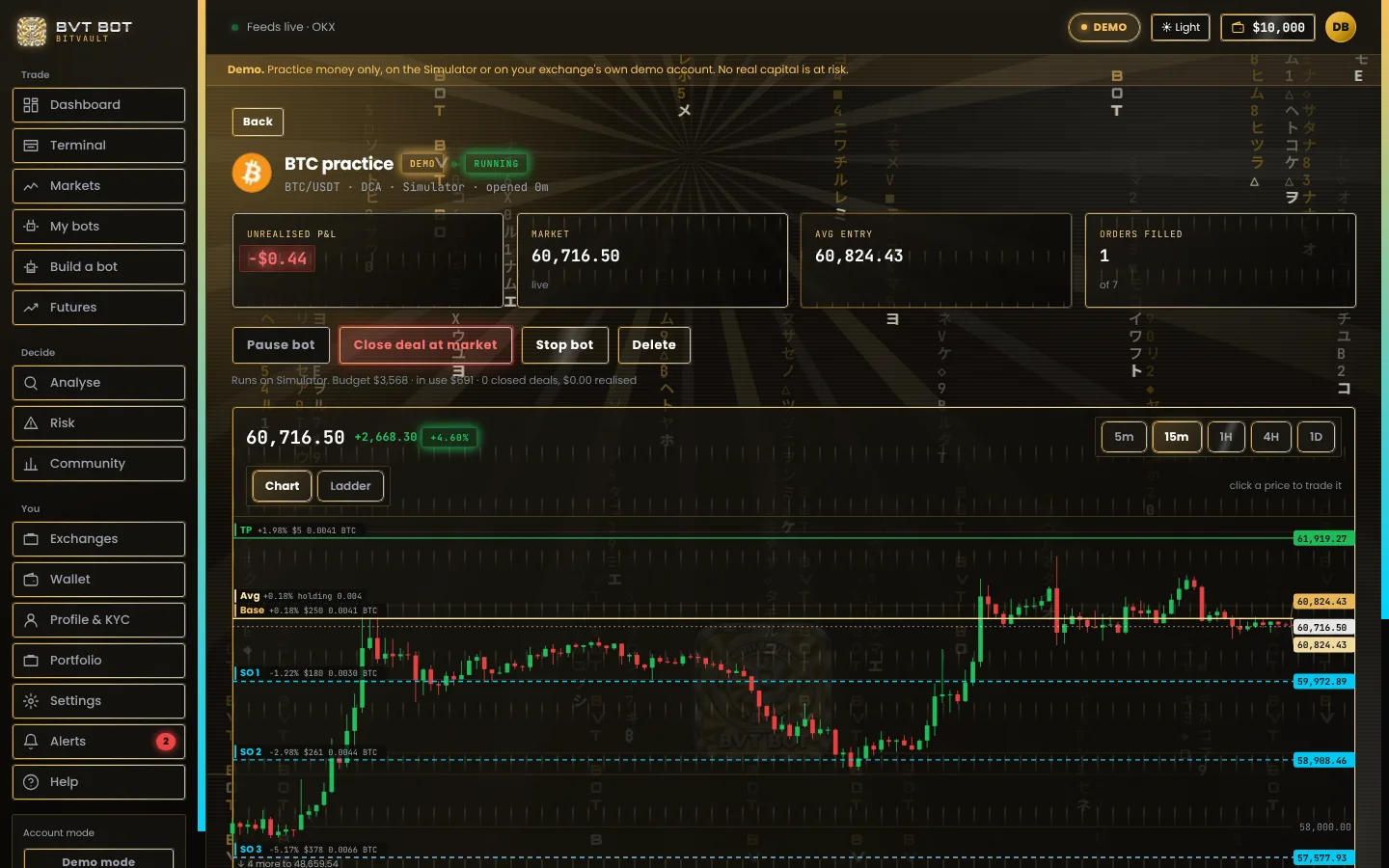
Real screens from the Windows app on live prices, with a practice bot on the Simulator.
[ /PRICING ]
Start free
Download BVT BOT and run every bot in Demo for free. Real-money trading and paid plans come next.
/DEMO/
Demo · free
The Simulator with 10,000 practice USDT, or your exchange's own demo account. All three bot types, charts, alerts and the kill switch.
Download for Windows/REAL/
Real money
The same bots on your live exchange account. It opens after a short identity check, which is not switched on yet.
When does Real open?/PLANS/
Paid plans
Plans and prices will be published here before Real opens. Nothing is charged today.
Ask a questionBVT BOT never holds your money and takes no share of your trades. Your exchange charges its own trading fees, as it always does.
[ /PLATFORMS ]
Windows, with alerts on your phone
The bots run inside the Windows app, so the PC must be on and online for them to trade. Close the window and they keep running in the tray. Switch on "Start with Windows" and they come back after a restart.
/WINDOWS/
Windows app
Windows 10 and 11. One installer, or a portable version that runs without installing.
Download for Windows/ALERTS/
Alerts on your phone
Connect your own Telegram bot in Settings and every fill, stop and pause reaches your phone. Windows notifications work on their own.
How alerts work/MORE/
Phone and browser apps
Not yet. Today BVT BOT is a Windows app. Anything new is announced on this page first.
Tell us what you need[ /FAQ ]
Questions
Does BitVault hold my money?
No. Your money stays on your own Binance, Bybit or OKX account. BVT BOT sends orders to that account through your API key. BitVault never holds funds and never receives your trades.
Can BVT BOT withdraw my money?
No. When you connect, BVT BOT asks the exchange what the key is allowed to do. If the key can withdraw, it is refused and not saved. Keys are encrypted with Windows' own protection on your PC and never leave it.
Which exchanges and coins?
Binance, Bybit and OKX, spot pairs quoted in USDT. The list is exactly what the exchange really trades right now. Futures and short bots are not in this version.
Will a bot make me money?
Nobody can promise that. A bot follows the rules you set. Prices can fall further than your safety orders and a bot can close at a loss. Practise in Demo first, and only use money you can afford to lose.
What is Demo?
Two kinds. The built-in Simulator gives you 10,000 practice USDT on live prices, with the exchange's real rules for order size and price steps, and fills simulated on your PC. Or connect your exchange's own demo account, where orders go to the exchange's demo system. No real money either way.
Does my PC need to stay on?
Yes. The bots run inside the app on your PC. Closing the window keeps them running in the tray. If the PC sleeps or restarts, BVT BOT checks every open order with the exchange when it is back and carries on.
When does Real open?
Real money needs a short identity check first. The check is not switched on yet. Real opens as soon as it is, and it will be announced on this page. Until then everything works in Demo.
How do alerts reach my phone?
In Settings, add a Telegram bot token and your chat. Fills, take-profits, stops and pauses are then sent from your PC straight to your Telegram. Windows notifications work without any setup.
Is BVT BOT free?
The download is free and Demo is free. Paid plans for Real will be published here before Real opens. Nothing is charged today.
Crypto trading is risky and you can lose money. BVT BOT is software that follows your settings. It is not investment advice. Read the risk warning.
[ /CONTACT ]
Talk to us
A question before you start, a problem in the app, or an idea for the next version. Write to us and a person reads it.
SUPPORT_CHANNEL
Tell us your BVT BOT version (Settings → PC app) and what you see. A screenshot helps.
Never send your password or your API keys. BitVault never asks for them, by email or anywhere else.